
Everything happening. Right here.
There’s a lot going on behind a good agent.
Hermie makes it easy to follow — and simple to be part of it.
Hermie is the Hermes dashboard in your pocket. It speaks to hermes serve over the gateway’s own session protocol, so everything below is the same work the desktop dashboard does — nothing here is a reduced mobile version of it.
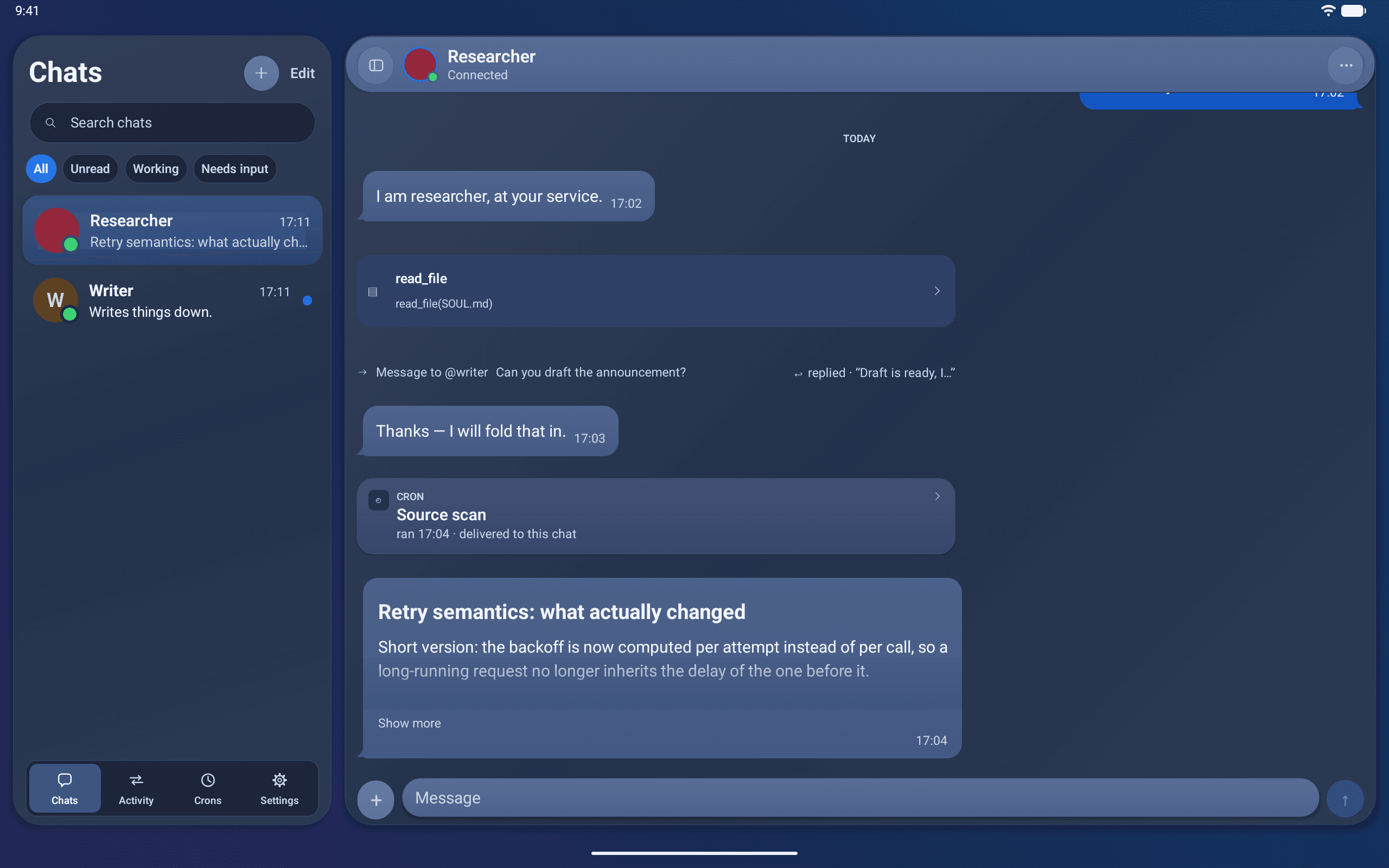
A conversation.
With the whole picture.
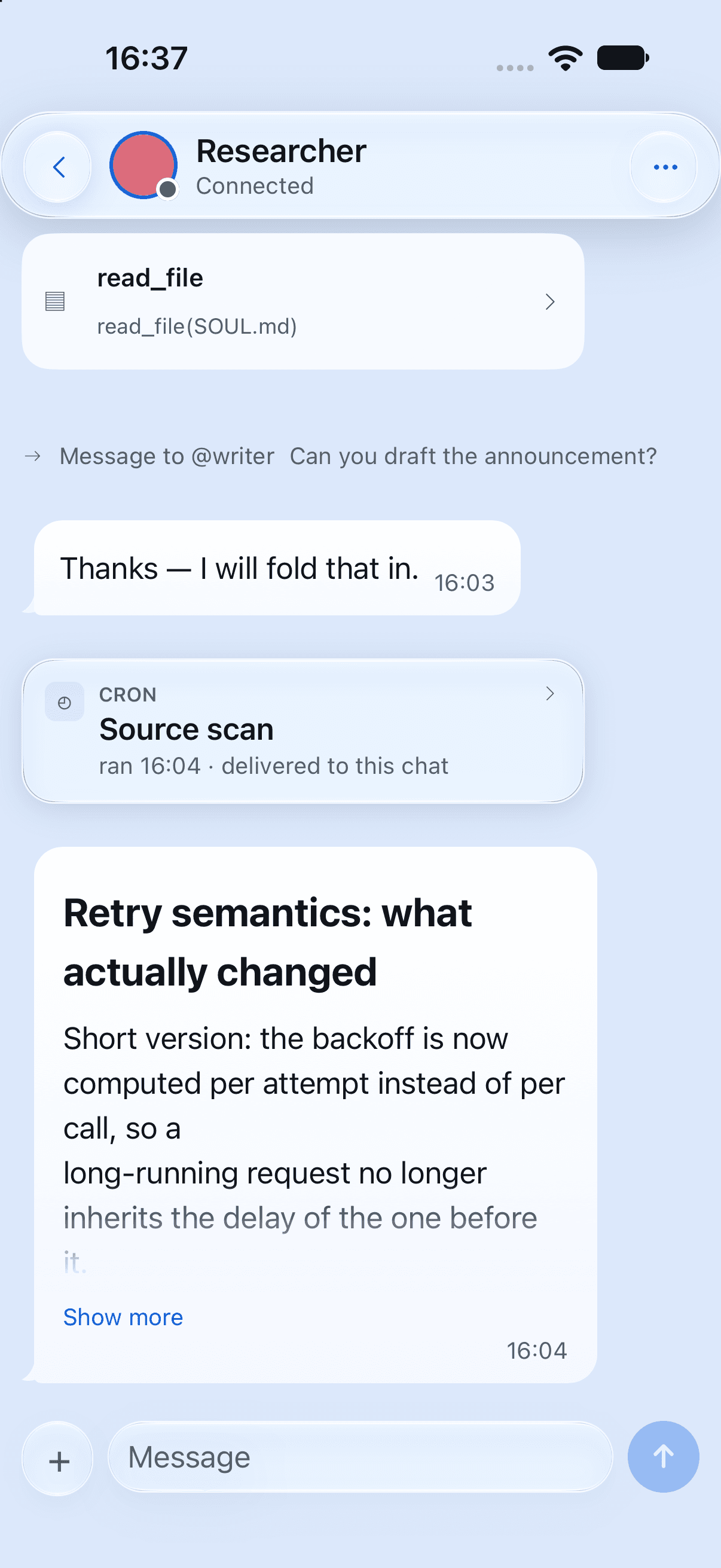
Every bot has its own chat. Messages arrive as they’re written, tools unfold as they run, and bot-to-bot exchanges keep both sides of the story together.
- Live responses and readable tool cards
- Three levels of detail, chosen by you
- One Activity timeline across your agents
Drawn, not printed.
A mermaid fence is a picture in the bubble and $…$ is set as mathematics, on every platform, with no web view and no fonts to download. That is the whole of the decision rather than an implementation note: a renderer that learns its own size a frame late moves the reader on an inverted list by exactly the correction, so the geometry is worked out before the row appears.
The subset is flowcharts in all four directions with the common shapes and edges, and the LaTeX a chat agent actually writes. Anything outside it falls back to the source in a code block, because a picture that quietly leaves out what the author asked for is worse than the text it was made from. Mathematics copies as its source, delimiters included.
Your agents work.
You stay in control.
A command needs permission. A task needs clarification. Hermie brings the question to you in a clear sheet, with the context you need to answer.
A permission request can also be answered from its card in the transcript, without the sheet — the buttons are exactly the ones the gateway offered, in the gateway’s own order, and answering either way takes the sheet down with it. Every answer takes an explicit action, and a question answered elsewhere says so.
Learn about app privacy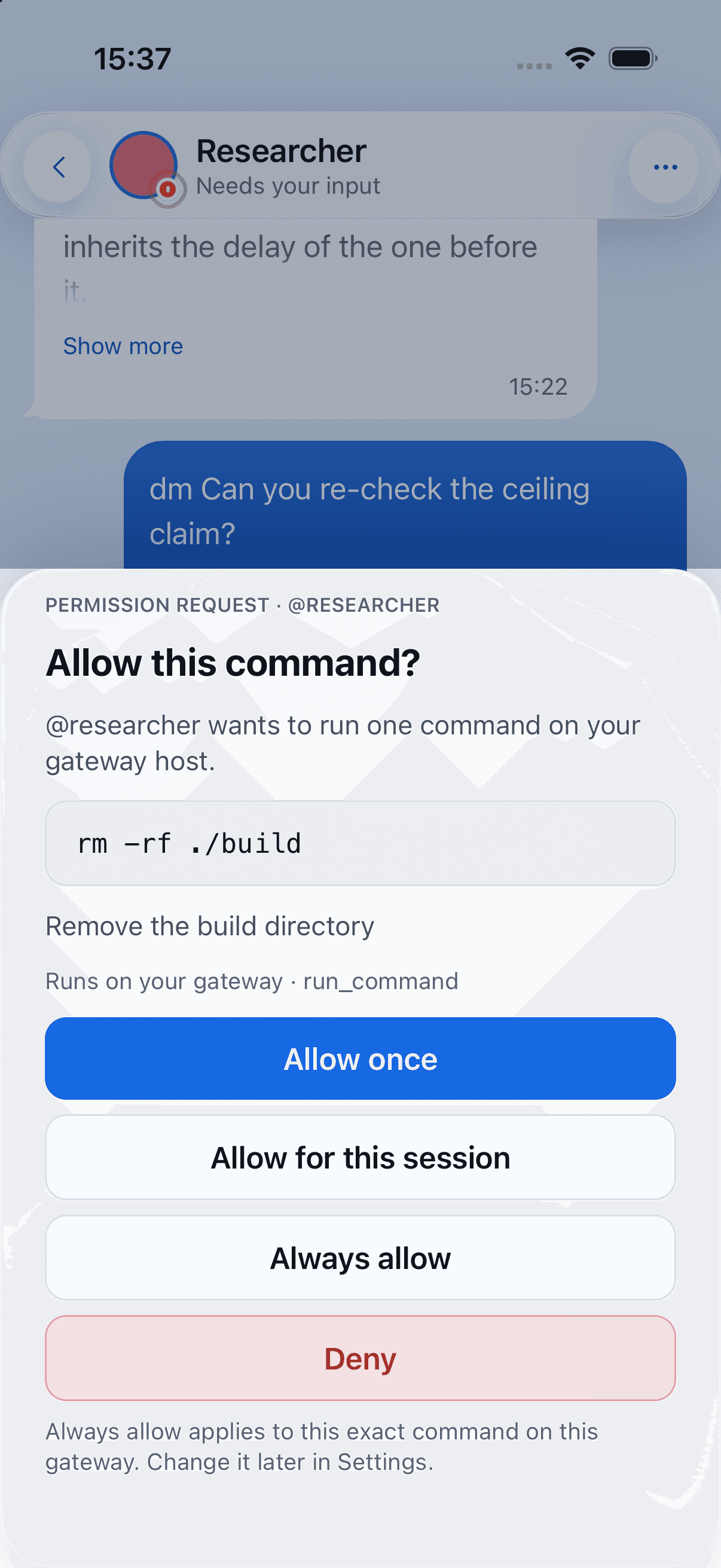
A little progress.
On repeat.
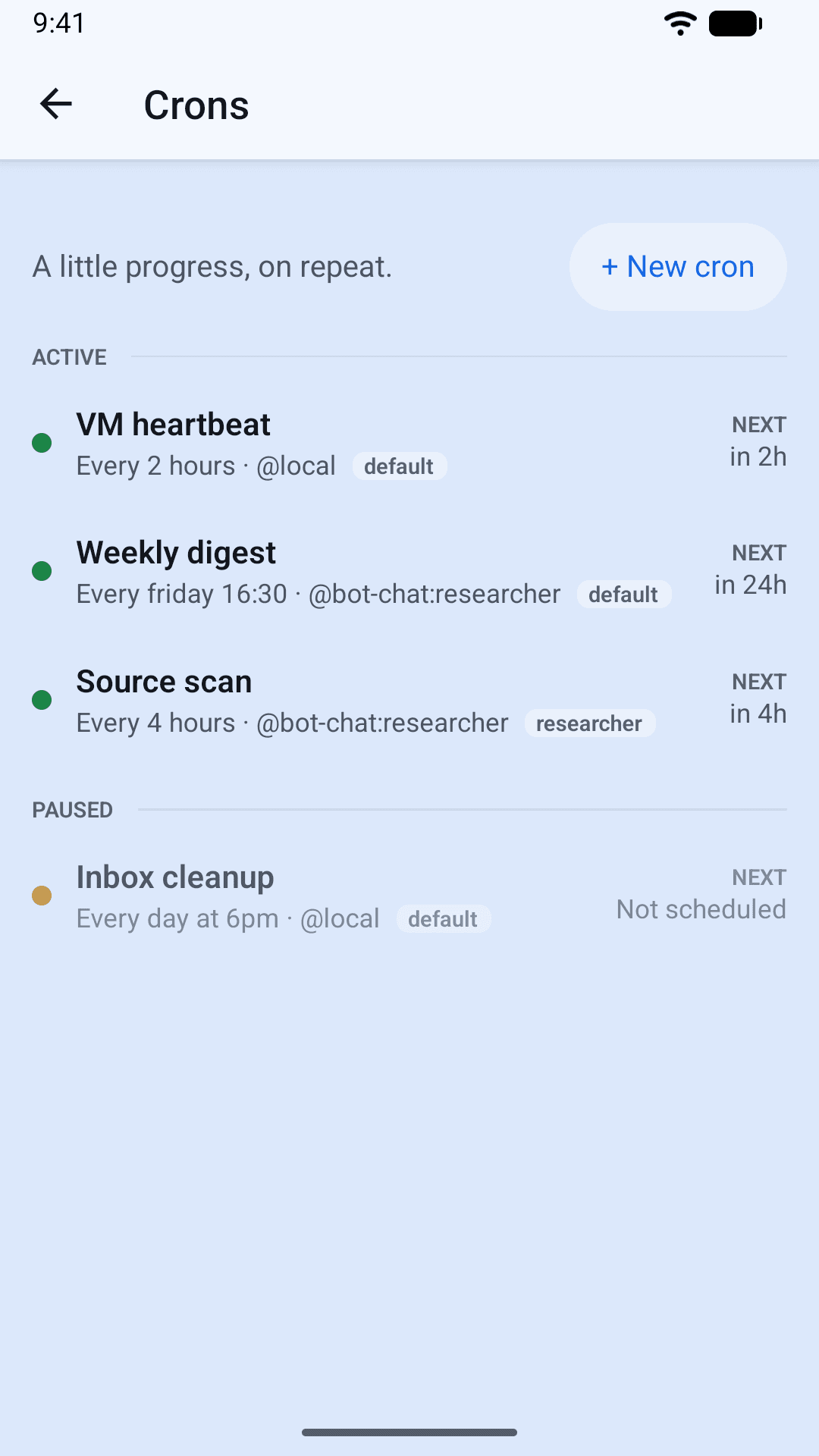
Keep an eye on the gateway’s scheduled jobs in Crons. See what runs next, pause what can wait, and run a job when you need it.
- Active and paused jobs at a glance
- Past runs and their transcripts
- Results delivered to the right conversation
Say it. Hear it.
On the device.
Any reply’s menu will read it aloud, in the voice built into your phone, your Mac or your browser. A chat can be set to read every finished reply on its own. A code listing is read as Code block, 12 lines rather than recited, a table a row at a time, and a link reads its label.
A microphone in the composer dictates: hold it to talk, or tap it and tap again. What you say lands at the caret, so it drops into a half-written message where you put it, and it is a draft like any other — nothing is sent until you send it. Voice mode runs the whole loop hands-free, shows you what it heard for a second before sending, and never sends an empty message.
Nothing is sent anywhere to be synthesised or transcribed. On iPhone, iPad, Android and the Mac the recognizer is asked for its on-device model and a device without one is refused rather than quietly falling back to the network — the words are a message you are about to send to your own gateway. A browser’s speech API offers no such guarantee, and one without the API shows no microphone at all.
Told, while it happens.
An agent that works while you are away is only useful if you hear about it. A small plugin inside your own gateway sends the notification: a bot answered, a command needs permission, a routine delivered, a scheduled run finished — or failed.
It installs with one command, adds nothing to your network, and keeps every registration on your gateway. The same plugin tells a bot what device you are on, so it can answer for the screen you are reading on.
- Seven types, switchable globally and per chat
- Allow or deny an approval from the notification
- A tap opens the conversation it was about — a branch included
- Bot name and event type only, unless you ask for more
Nothing to install.
Just a browser tab.
Hermie Web is the same app, exported for the browser and served by one small process you run next to your own gateway. Open it from a work laptop, a borrowed machine or a phone you can’t sideload onto — nothing is installed on the device.
It is set up once, by whoever runs it. Everybody else only ever sees a sign-in: no address to type, no probe to wait for, no wizard. It keeps a copy of each chat’s tail on its own disk, so a chat opened on a machine that has never seen it paints at once and then stays still, and /admin is where its push, its cache and the people who signed in through it are set.
- Nothing installed on the device you open it from
- Self-hosted, beside your gateway, on its own port
- The gateway reached through it, on the same origin
- An operator page, and a sign-in for everybody else
The small things you do all day.
A conversation is where nearly all of the time goes, so this is where the detail is.
Start over, and keep what you had.
Typing /new really does start a new conversation: the old one is retired under its own name rather than deleted, the chat keeps its place and its colour, and the transcript says which conversation was put away. ⌘N does the same thing on a Mac.
Branch from any message.
“Branch from here…” forks the conversation at that point into a session of its own. The chat it came out of is untouched — what happens on screen is a line saying the branch exists, and an offer to open it.
Every conversation on one page.
Conversations, from a bot’s profile or the chat’s own menu: the current Bot Chat, the branches, and the ones /new has put away, each with its preview and when it was last active. Read one, rename it, delete it, or make it the Bot Chat again.
Pin the chats you are actually in.
A pinned chat sits at the top of whatever holds it — its folder, or the list itself. It is a sort rather than a move, so unpinning drops the row back into the gap it left instead of wherever the top of the list has drifted to.
A command’s answer stays on screen.
The reply to a slash command survives every verbosity level and arrives already open, because a line you typed yourself is not the machine talking. A slash list that the gateway refuses says which method refused and repeats the gateway’s own words, rather than drawing an empty popover.
Edit and resend, or ask again.
A message’s own menu puts one of your turns back in the composer with the attachments it carried, and offers the newest reply again through the gateway’s own /retry. Both are greyed while a turn is running rather than disappearing.
How much room is left.
The chat’s options carry a ring, a percentage and both counts — 82% · 164k / 200k — following the session’s own usage ticks. A gateway that does not report a window size simply shows one row fewer.
Take the conversation with you.
Export a chat as Markdown or as plain text: the share sheet on a phone or a Mac, a download in a browser. What you get is what is on screen, so a chat you set to Quiet exports the quiet conversation.
The menu does not move the chat.
The (…) opens a floating menu under the header instead of a sheet that pushes the transcript up. Pickers that are genuinely a page — the model catalogue, the colours — still open as one, already on the page you asked for.
Bring the context.
Share a photo, a PDF, a spreadsheet or anything else the picker will give you. Each attachment is its own chip, which says while it is uploading and says so on the chip if the gateway refuses it.
Text the size you read at.
Small, Default, Large or Extra large, in Settings and in the chat’s own menu. It changes the size of the conversation — the bubbles, the Markdown, the code — and of nothing else, on top of the text size your device already asked for.
What each one is, and what it may do.
A bot is a profile on your gateway. Hermie can read it, change it, and make another one — the memory pages need the gateway plugin, and say so when it is not there.
Make a bot, from the app.
New bot… in the chat list or in Settings: a handle, a description, a model from the gateway’s own catalogue, and optionally another bot’s settings to start from. The handle is checked as you type it, by the gateway’s own rules.
Rename one.
On the default profile the field sets a display name. On any other profile it renames the profile itself — the handle crons, @-mentions and the gateway’s logs use — and the sheet says so before you save. Your colour, folder, mute and note come along.
What a bot can do.
Capabilities on the bot’s profile: its toolsets, its skills and its MCP servers as switches that write as you touch them. A bot with no toolset pin is following the gateway’s defaults, and the sheet says that rather than showing everything as off.
What a bot remembers.
Both of Hermes’ memory files, with the characters each is spending, a search that runs on the gateway, and add, edit and remove. An entry is addressed by its text rather than by its position, so one that moved cannot be overwritten by mistake.
A map of that memory.
A Graph tab beside the entries: the bot in the middle, an entry per memory, and a line wherever two of them mention the same topic. Drawn in the app, from the same seed every time, so a cluster you learned the position of stays where you left it.
MCP servers.
The gateway’s servers, what each one is and whether it is connected. Open one to test the connection, see the tools it offers, or authorise it where it sits behind OAuth. Nothing is probed on arrival — a cold server takes seconds to answer.
Skills.
What is installed, a switch per skill for whichever bot you pick, and a search of the hub to install more. Without a bot chosen there are no switches, rather than switches at a guessed position.
Connectors.
The apps a bot signs in to on your behalf, and a Connect that opens the provider’s page in your browser. It is per chat, because that is how the gateway scopes it. Signing one out is done where the account lives, and the page says where.
The gateway’s logs.
The six files hermes logs knows, with a level, a component, a search that runs on the gateway and a copy. Follow re-reads every few seconds and says so: there is no live stream to subscribe to, and calling a poll a tail would be a claim about your gateway.
Boards.
The gateway’s Kanban boards, their columns and their cards — make one, edit it, move it, archive it, comment on it. The same store the Hermes desktop app uses, so a card moved on a phone is the card the desktop redraws.
One app, more than one machine.
The chat list, the gateways behind it, and who the gateway thinks you are.
More than one gateway, one at a time.
Settings → Gateways keeps every gateway this device knows, names them what you like, and switches with a tap. Each keeps its own sign-in, cached conversations, read marks and arrangement, even when both have a bot called researcher.
A chat of your own, beside the shared one.
On a gateway that knows who you are, each bot carries a switch: the shared Bot Chat that the desktop app and your colleagues are in, or a second conversation named after you that only you open. The choice follows you to your other devices.
The profile name leads.
A bot has a handle and a display name, and both are drawn: a large line and a small one on the row, the header pill and the profile sheet. Settings → Appearance → Bot names swaps which is which, app-wide.
One grip, and folders that drag too.
A row in edit mode has a single six-dot grip labelled “Hold to drag” instead of a pair of arrows crowding the same column — and a folder has the same grip, the same lift and the same settle. Dropping a chat onto a folder still puts it inside.
Find your own order.
Rearrange chats, group them into folders, add named dividers, give a chat its own colour, archive the ones you are done with. The arrangement is per gateway, and it follows your account to a second device.
Notifications per chat, not just on or off.
Beyond muting: a chat’s own Notifications page carries finished a turn, a turn failed, needs your answer and scheduled runs. A type you give a chat no opinion about follows the global setting as that setting moves.
A lock, if you want one.
Face ID, Touch ID, Optic ID or your Android fingerprint, with the device passcode behind it — immediately, or after a few minutes away. A locked Hermie does not draw its contents behind the plate; it does not draw them at all, which is what the app switcher photographs too. It stays on the device you set it on.
Whatever is in front of your gateway.
A gateway on a tailnet, a gateway behind an identity-aware proxy, a gateway you have not put on the network at all — setup is the same three steps, and it says which of your problems you have.
Behind Cloudflare Access.
A preset rather than two header names you have to know: a Client ID and a Client Secret from a service token, carried on every call, the WebSocket dial and the sign-in page. It is bound to the gateway address you entered it for and withheld from a cleartext one, with the reason on screen.
“Is this device on the tailnet?”
An address that answers with a web page on a host only one network can reach now says so, and so does one that will not resolve at all on mobile data. It stays quiet wherever the same evidence would be a guess.
A failure with a next move in it.
Where there is something to do, setup offers it as a button rather than describing it — the host that actually answered, or a way straight to the proxy credentials — and the offer goes the moment you start typing a different address.
Plain http on a private network.
On a tailnet, a LAN or the same machine, http:// is fine and Hermie says so on screen rather than warning about it. The warning is for an address anybody could be on the path to.
Where the rest of your phone meets it.
A share sheet, a Shortcut and a widget each run in their own process with no gateway of their own, so all three hand over through a file the app reads rather than a connection or a link that carries content.
Share to Hermie.
An image, a file, a link or some text from any app goes straight into a chat. A share made with no route to the gateway waits, the chat’s row says so, and it goes out on the next reconnect.
Shortcuts, Siri and Spotlight.
Ask a bot waits for the reply so it can flow into the next step of a Shortcut, Send to a bot returns as soon as the gateway has the prompt, Open a chat is a Home Screen button, and Bots needing input answers without opening Hermie at all. Your bots are in Spotlight too.
A widget for one folder.
The medium widget can be pinned to one folder of your list instead of the whole of it: that folder’s three most recent chats, its name, its badge and a dot when something inside is waiting on you. Tapping the header opens the list there.
What a widget can honestly know.
Widgets are drawn from a snapshot the app writes as it goes. Nothing polls your gateway in the background, so a widget shows what Hermie last saw — a phone whose Hermie has not run for a week shows a week-old widget.
In your own words.
Hermie is available in English, Dutch and German, and follows the language your device is set to.
Pick up where you left off.
The last stretch of every conversation is cached on the device, ready to read before the gateway answers — or on a plane. Reading a cached conversation offline does not run your agents on the device.
Good software is better
in the open.
Developed by FullStack Studio. Built for the Hermes community.
Explore the project